


Setting Account Type
A new setting has been added to Analytics Pro v1.2.1 that allows you to select the type of
Account that is authenticated by Analytics Pro.
This allows you to authenticate with a Google Account or a Hosted Account such as Google Apps.
In most cases "Google" should be used.
The setting appears in the second row of the Account Details section.
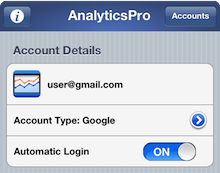
To change the setting, press the blue Disclosure Button or tap the 'Account Type' row. This will display the "Account Type" screen where you can select either "Hosted or Google" or "Google".
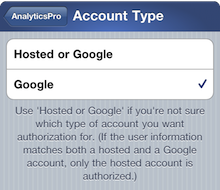
If you are using a Google Apps account and select "Hosted or Google"
you may see one of the following messages:
- "No Analytics Account" or
- "Bad Authentication - The login request used a username or password that is not recognized"
In most cases selecting "Google" should solve login issues.
The follow note describes the difference between "Hosted or Google" and "Google":
GoogleIf you set the Account Type to "Google", it will only authorize a Google Account.
Use this option if you are using a Google Apps account that has recently been upgraded to a Google Account.
Hosted or GoogleIf the user information (username and password) matches both a hosted and a Google account, only the hosted account is authorized. (A Google Apps account is a hosted account).
If you only have a Google Account it will authorize the Google Account.